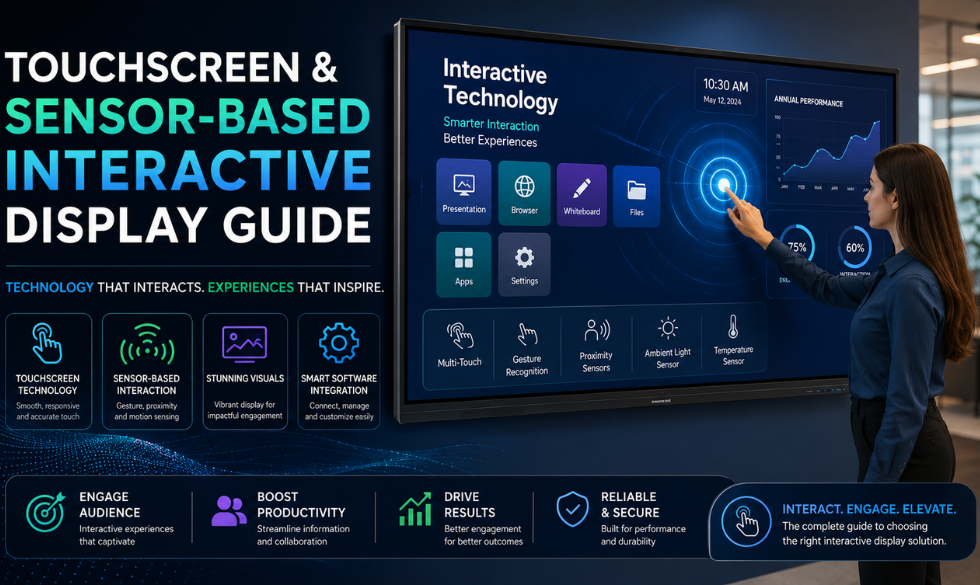
Businesses often shop for an interactive display by screen size and resolution first, and treat the touch layer as an afterthought. That is a mistake. The sensing technology underneath the panel affects accuracy, durability, and even who can use the screen, whether that is a bare finger, a gloved hand, or a stylus. It is a layer that sits on top of the broader display technologies a business chooses from.
Both figures come from Fortune Business Insights, and the dominance of capacitive touch reflects why it has become the default choice across retail, corporate, and education deployments, though it is not the right fit for every environment.
How Touch Sensing Actually Works
A touchscreen is not one piece of technology, it is a sensing layer paired with a display. The sensing layer detects where and how a surface is touched, then passes that coordinate to the software running the display. Different sensing methods trade off cost, accuracy, durability, and what kind of input they can detect.
Types of Touch and Sensor Technology
Capacitive (PCAP)
Detects the electrical charge from a bare finger, supports multi-touch, and offers a fast, smartphone-like response. Does not reliably work with gloves or a passive stylus.
Best for: retail, kiosks, education
Infrared (IR)
Uses a grid of infrared beams around the screen edge to detect interruption from any object, including gloves or a stylus. Very durable but less precise for fine detail.
Best for: outdoor kiosks, industrial use
Resistive
Responds to physical pressure through two flexible layers, so it works with gloves, styluses, or fingernails. Less accurate and does not support true multi-touch.
Best for: point-of-sale, basic terminals
Surface Acoustic Wave (SAW)
Uses ultrasonic waves across the glass surface to detect touch, offering high image clarity since nothing overlays the screen. Sensitive to surface contamination like dust or liquid.
Best for: clean indoor environments
Proximity & Gesture Sensors
Detects motion or hand position near the screen without physical contact, using infrared or optical sensors, useful where hygiene or accessibility matters.
Best for: healthcare, public terminals
Optical Imaging
Uses cameras at the screen corners to triangulate a touch point, scaling well to very large display sizes without losing accuracy, which is why it pairs well with large-format video walls.
Best for: large-format interactive walls
Where Touch Technology Choice Actually Matters
Outdoor and Semi-Outdoor Installations
Dust, rain, temperature swings, and users wearing gloves all rule out delicate sensing methods. Infrared touch is generally the more reliable choice here because it keeps working regardless of what is touching the screen.
High-Traffic Public Terminals
Screens used by hundreds of people a day, such as retail kiosks or check-in terminals, need a sensing layer that stays accurate under constant use. Capacitive touch is the standard here because it responds quickly and supports the swipe and pinch gestures people already expect from their phones.
Healthcare and Hygiene-Sensitive Spaces
In clinics and hospitals, a screen that many hands touch throughout the day raises hygiene concerns. Proximity and gesture sensing, or antimicrobial capacitive surfaces, reduce direct contact while still giving users control, an important consideration for the self-service and information kiosks increasingly deployed in these spaces.
Choosing the Right Technology: A Quick Checklist
Define the Environment
Indoor, outdoor, dusty, humid, or climate-controlled conditions all narrow down which sensing technology will hold up over time.
Identify Who Will Touch It
Bare fingers, gloved hands, a stylus, or contactless gestures each favor a different sensing method, so match the technology to the actual users.
Decide if Multi-Touch Is Necessary
Applications like wayfinding maps or collaborative boards benefit from true multi-touch, while a simple menu selector may not need it at all.
Account for Expected Traffic
High-traffic public screens need a sensing surface rated for constant daily use, not a technology designed for occasional interaction.
Factor in Total Cost of Ownership
A cheaper resistive panel that needs frequent recalibration or replacement can cost more over time than a durable capacitive or infrared panel.
Run Any Touch Technology on One Platform
Intelisa's cloud-based platform runs interactive content on any touchscreen or sensor-based display, whatever the underlying touch technology, and keeps every screen updated and monitored from one dashboard.
- Compatible with capacitive, infrared, and resistive touch panels
- Update interactive content across every screen instantly
- Monitor touch response and device health remotely
- Scales from a single display to a full deployment
Frequently Asked Questions
What is the difference between capacitive and infrared touch?
Capacitive touch detects the electrical charge of a bare finger and offers a fast, smartphone-like response, but does not reliably work with gloves. Infrared touch uses a grid of light beams to detect interruption from any object, including gloves or a stylus, making it more durable for rugged or outdoor use.
Which touch technology works best outdoors?
Infrared touch technology is generally the most reliable choice for outdoor or semi-outdoor installations, since it continues to respond accurately in dust, moisture, and temperature swings that can affect other sensing methods.
What is a sensor-based interactive display?
A sensor-based interactive display uses proximity, gesture, or optical sensors to detect a user's presence or motion near the screen, allowing interaction without direct physical contact, which is useful in healthcare and other hygiene-sensitive environments.
Does touch technology affect multi-touch support?
Yes. Capacitive touch reliably supports true multi-touch gestures like pinch and swipe with multiple simultaneous points of contact, while resistive touch technology generally does not support multi-touch in the same way.
Why is capacitive touch the most common technology?
Capacitive touch holds roughly 68% of the interactive display market because it delivers a fast, accurate, multi-touch response that feels familiar to users already accustomed to smartphones and tablets, making it the default choice for retail, kiosks, and education.
Is the interactive display market growing?
Yes. The global interactive display market was valued at approximately $59.83 billion in 2026 and is projected to reach $125.48 billion by 2034, growing at a 9.70% CAGR, driven by adoption across retail, education, corporate, and healthcare environments.
Final Takeaway
The sensing technology behind a touchscreen determines how it will actually perform once it is installed, and that choice matters more than screen size or brand. Matching the technology to the environment, the users, and the expected traffic prevents a display from becoming unreliable within months of deployment.
Deploy the Right Touch Technology for Your Space
Intelisa runs interactive content across any touchscreen or sensor-based display, and keeps every screen managed and monitored from one dashboard.
Book a Free Trial